Are your clicks bringing buyers?

Follow visits beyond the ad click.

Works on any store where you can add a script, or through Google Tag Manager. No ad account connection. Plans start at $30 a month.
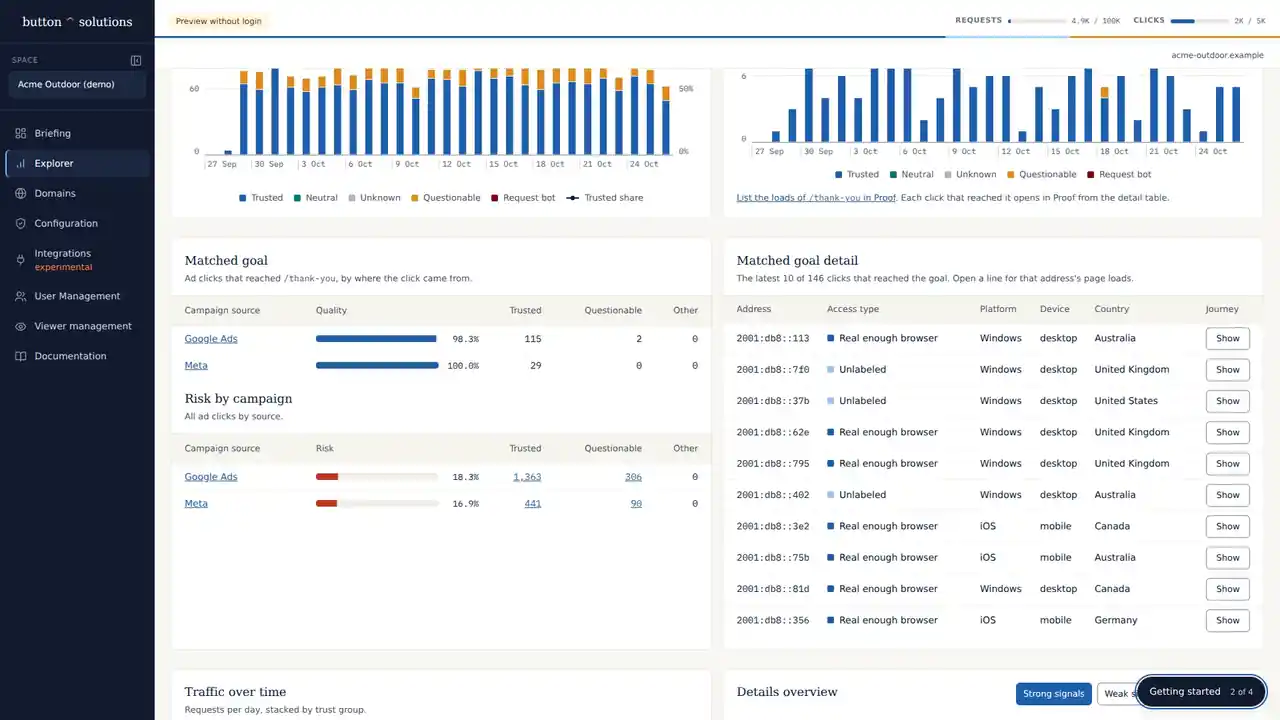
Button Explorer: ad clicks by trust group over time, the clicks that reached the thank-you page by campaign source, and the latest of those clicks (demo data)
Explorer with demo data. A goal-page visit is not a verified sale.

“I’m spending real money on ads. Is this traffic any good?”

Ad platforms tell you clicks, conversions and ROAS. Store analytics tell you sessions, carts and sales. Button connects the two and gives you an independent view of the traffic you actually bought.

What happens after the click?

Which campaigns need attention?

Compare tagged campaign traffic.

→

What happened after the click?

Follow observed paths toward product, cart and checkout pages.

→

Why was a visit flagged?

Read the classification evidence.

→

Suspicious is a question, not a verdict.

One proxy flag did not justify blocking. In one e-commerce investigation, flagged and unflagged visitors progressed similarly.

Read the traffic investigation →

Begin on the store you already run.

01

Add one script

Paste it into your store's theme, or add it through Google Tag Manager, then verify your domain.

02

Review what arrived

Compare campaigns and investigate visits.

03

Choose what to change

Keep observing or configure supported controls after review.

Especially useful when you still look at the numbers yourself.

  • You spend meaningful money on Google or Meta every month.
  • You still review campaign performance or ROAS yourself.
  • You want a second opinion before moving budget or blaming targeting.
  • You care more about real shoppers than “bots blocked”.

Clear conclusions. Decisions you can stand behind.

Know when to investigate, act or leave traffic alone. Plans start at $30 a month.

Investigate your traffic